Intent Classification — Overview
Audience: Business stakeholders, product owners, analysts, new team members. This document answers "what does this module do and why does it matter?" in plain language. No unexplained technical jargon.
This content was migrated from
Documentation/INTENT_CLASSIFICATION.mdand restructured into audience sections. Review for accuracy against the current codebase.
What This Module Does
Intent Classification is the first step in how Swisper understands every message a user sends. Before the assistant can respond, it needs to figure out two things: what kind of request this is, and who (if anyone) the user is talking about. This module answers both questions in a single step.
It decides whether a message needs a straightforward conversational reply (like answering a knowledge question) or requires connecting to external tools (like checking emails or scheduling meetings). It also identifies any people or pets mentioned in the message so the system can look up relevant personal information. On top of that, it detects when the message contains facts worth remembering, style preferences, or time-related queries — and signals downstream processing to skip unnecessary steps, making responses faster and cheaper.
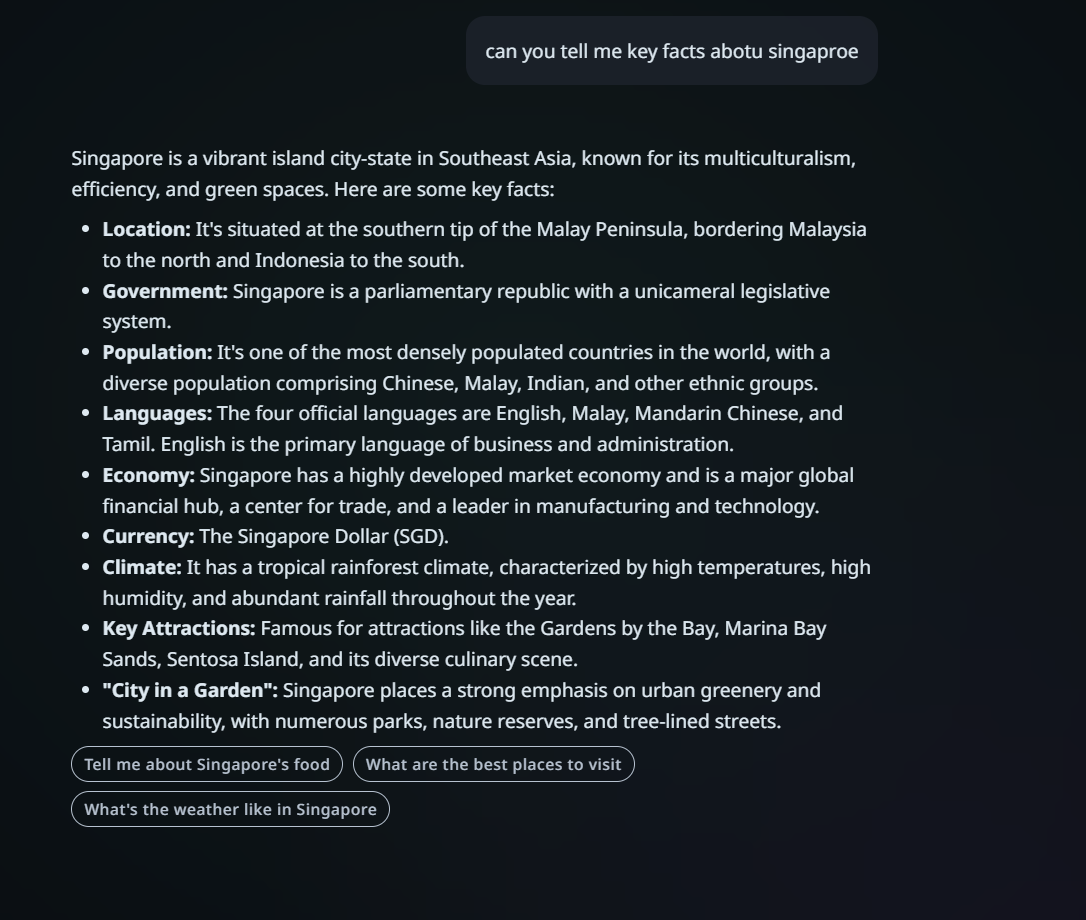
Simple response — A general knowledge question like "tell me key facts about Singapore" is classified as a simple conversation. The assistant responds directly from its own knowledge without invoking any external tools.
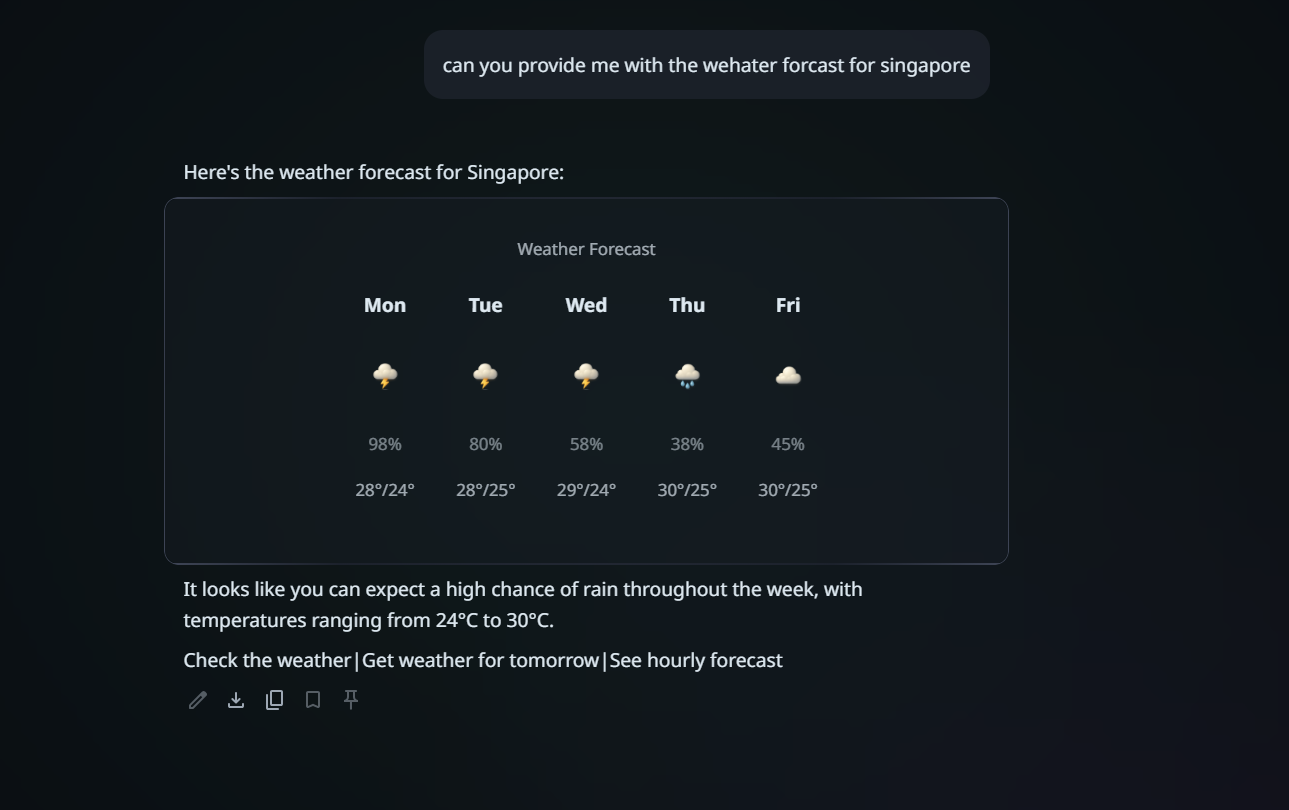
Complex response — A request like "provide me with the weather forecast for Singapore" is classified as a complex request. The system routes this to the research agent, which fetches live weather data and returns a rich weather card.
Who It Serves
- End users who benefit from faster, more accurate responses — the system understands their intent in one pass instead of running every processing step regardless.
- Product owners who need to understand how Swisper decides which capabilities to invoke for a given message.
- New team members who want a clear picture of how message routing works before diving into the codebase.
Key Capabilities
- Classifies each message as either a simple conversation (handled directly) or a complex request (requiring tools like email, calendar, or web search).
- Extracts people and pet mentions — by name, relationship ("my wife"), or pronoun ("him") — enabling personalized responses.
- Detects time-related queries (birthdays, schedules, countdowns) to trigger date-aware processing.
- Identifies storable facts in user statements (e.g., "My son's birthday is June 15th") so the system can remember them.
- Recognizes response style preferences (e.g., "be concise", "use emojis") and applies them to future replies.
- Supports privacy mode toggling for controlling access to sensitive personal information.
- Sets optimization flags that allow downstream processing steps to be skipped, saving 2–3 seconds of latency and up to 13,000 tokens per request.
How It Fits in the Platform
Intent Classification is the first processing node inside the Global Supervisor, which orchestrates all conversation flow. Every user message passes through this module before anything else happens. Based on its classification, the Global Supervisor decides which downstream nodes to run — for example, routing a simple knowledge question directly to a response generator while sending a "schedule a meeting" request through the full planning and tool execution pipeline. The entities it extracts are used by the Entity Disambiguation module to resolve mentions to specific known people, and its optimization flags control whether the Fact Extraction and Semantic Retrieval modules are invoked.
Limits and Edge Cases
- LLM-dependent classification: The routing decision is made by a language model, which means edge cases (e.g., ambiguous commands like "I want to send an email") may sometimes be misclassified. The system enforces invariant rules to catch known error patterns, but novel ambiguities require prompt tuning.
- Pronoun resolution limited to one turn: The module uses only the immediately preceding conversation turn for resolving pronouns like "him" or "her." Multi-turn pronoun chains (where "him" refers to someone mentioned three turns ago) may not resolve correctly.
- Privacy mode is currently disabled: Although the schema supports privacy mode toggling, this feature is disabled in the current codebase due to reliability issues (hotfix #805/#807). Privacy mode changes are always set to null.
- No offline or fallback classification: If the language model call fails (timeout or error), the system falls back to a conservative default (simple conversation, retrieval enabled) rather than attempting local classification. This means complex requests may be underserved during outages.
FAQ
Q: How does Swisper decide whether to check my email or just answer a question? A: Intent Classification looks at what you're asking for. If you say "tell me about quantum physics," it knows that's a knowledge question and responds directly. If you say "check my emails," it recognizes the need for an external tool and routes the request through the full processing pipeline.
Q: Does the system remember people I mention? A: Yes. When you mention someone by name (like "Martin") or by relationship (like "my wife"), the Intent Classification module detects this and triggers a lookup of stored information about that person. This is how the assistant can give personalized answers like "Martin prefers Italian food."
Q: Why are some responses faster than others? A: Intent Classification sets optimization flags that tell the system which processing steps to skip. A simple greeting like "Hello!" can skip fact extraction, preference analysis, and memory retrieval — saving several seconds. A complex request like "Schedule a meeting with Martin tomorrow" needs all those steps and takes longer.
Q: Can the classification be wrong? A: Occasionally, yes. The system uses a language model for classification, so edge cases exist. For example, "I want to send an email" is classified as expressing a desire (simple), not as a command. The team continuously refines the classification prompt to handle these nuances. The system also has built-in invariant checks that auto-correct certain known error patterns.