Branches, Overlays & Freshness
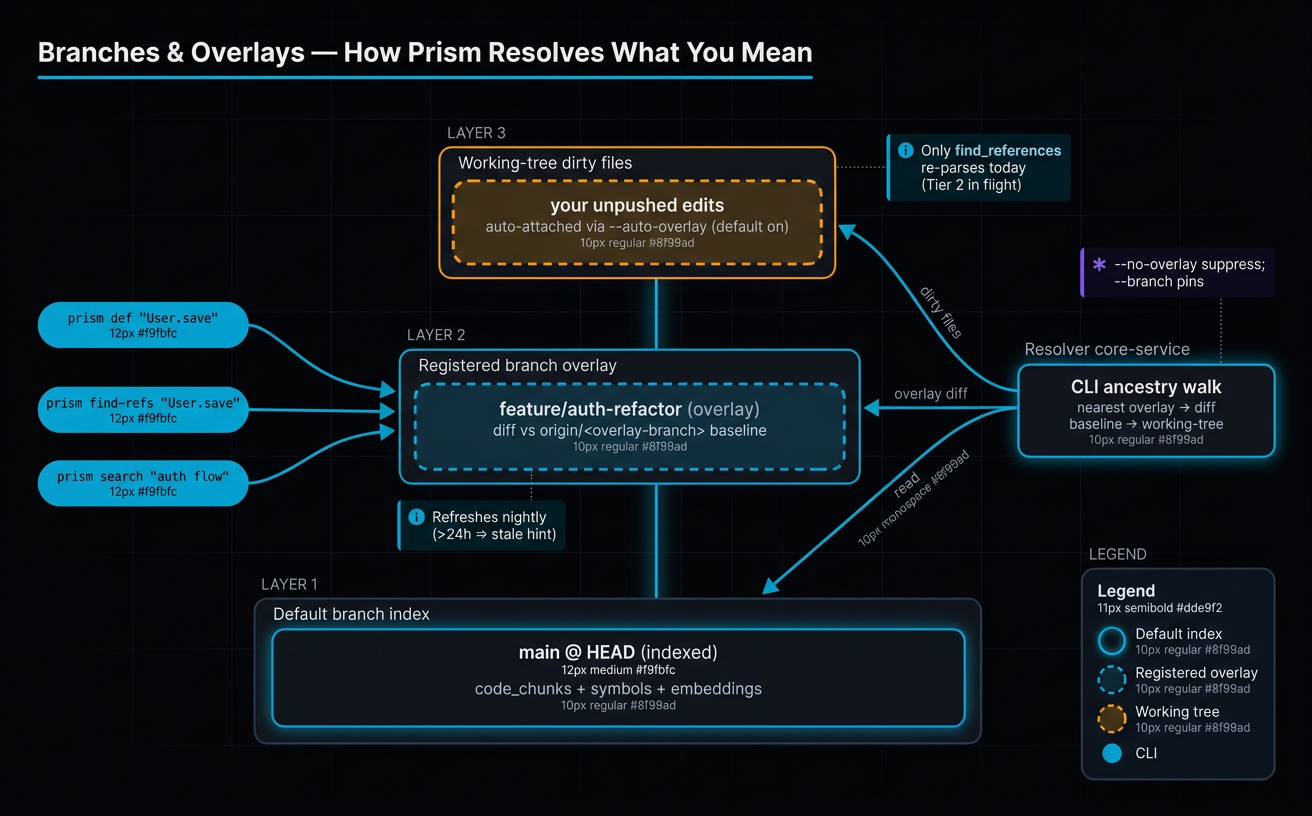
Prism's index is built from the default branch of each connected repo. When you work on a feature branch, the CLI layers your local state on top of that index automatically so reads stay accurate. This guide explains the three layers — default-branch index, auto-overlay for working-tree dirty files, and registered overlays for long-lived feature branches — and how to read the freshness fields that every response carries.
When to read this
- You started a feature branch and want to know what
prism searchis actually searching. - You see
resolved_overlay_branchin a tool response and want to understand what it means. - You're considering
prism branch createand want to know whether your branch is long-lived enough to justify it. - A teammate pushed a commit to your overlay branch and you want to know how stale the index is.
- You hit an
overlay_recommended_forhint and want to know what the CLI is asking you to do.
How the CLI keeps your answers fresh
Every Prism read call (search, find-refs, def, body, outline, module-map, prepare-edit) consults three layers, in order of authority:
- Default-branch index. The Gateway keeps an AST-chunked, BM25-+-vector-indexed snapshot of the repo's default branch, refreshed by the three-tier ingestion pipeline. This is the baseline every query starts from.
- Auto-overlay (working-tree dirty files). On every read, the CLI runs
git statusandgit diffto collect files you've changed since HEAD or since your overlay baseline. The contents are attached to the request as an_overlaypayload so the Gateway can re-parse them on the fly. - Registered overlay (long-lived branch). If your current branch is itself registered as an overlay — or descends from one — the Gateway uses chunks indexed against that overlay's HEAD as the primary source, with auto-overlay layered on top for anything you've changed since the overlay was last indexed.
Layer 1 is always present. Layer 2 is automatic — --auto-overlay is on by default, no flag required. Layer 3 only activates if prism branch create has been run for a relevant branch.
The result: most of the time you don't think about overlays at all. The CLI handles them, and your responses contain enough metadata (resolved_overlay_branch, overlay_consumed, indexed_at) to verify what happened.
When to register an overlay (the >1 week heuristic)
For short-lived branches — anything that merges within a few days — don't bother with prism branch create. The default-branch index plus auto-overlay covers you. The trade-off only flips for long-lived branches because registering an overlay costs a full clone-+-index pass (minutes, sometimes longer for large repos) and ongoing storage in the Console's database.
The decision rule:
| Branch lifetime | Recommendation | Why |
|---|---|---|
| < 1 week | Don't register. Default + auto-overlay is enough. | Overlay registration cost (clone + index) exceeds the value over a few days of edits. |
| 1–2 weeks, small change set | Optional. Register if you notice search misses on branch-only symbols. | Auto-overlay only attaches files you've touched in this session; symbols added by teammates on the branch won't appear in search. |
| > 1 week, or many commits, or shared with teammates | Register. | Search, find-refs, and module-map should reflect the branch's real shape — not just your local diffs. |
| Integration branch (multiple sub-branches off it) | Register. | Sub-branches resolve to the parent overlay via ancestry walk — one registration covers all the sub-branches. |
Auto-overlay handles your unpushed files. A registered overlay handles the whole branch's diverged state, including commits from teammates, files deleted on the branch, and renames.
prism branch create and prism branch delete
Register an overlay while the branch is checked out:
The Gateway clones the branch, runs the full ingestion pipeline (chunk → embed → describe → PageRank), and writes the overlay rows distinguished by a branch column in prism.code_chunks. The Console dashboard shows the overlay's status and indexed_at timestamp once it lands.
When the branch is merged or abandoned, delete it:
The handler removes overlay chunks and any tombstones (records of files deleted on the overlay) in the same transaction, so a re-registered same-name branch starts clean.
You can list active overlays for the current repo with:
Sub-branch behavior (ancestry walk)
A long integration branch can have many sub-branches off it. You don't register an overlay per sub-branch — the CLI walks Git ancestry to find the nearest registered overlay automatically.
Algorithm (the CLI runs this on every read):
- Detect the current branch. If it's itself a registered overlay, use it.
- Otherwise, fetch the repo's overlay list from the Console API.
- For each active overlay, try
git merge-base --is-ancestor <overlay-ref> HEAD. The fallback chain isorigin/<overlay-branch>→ localrefs/heads/<overlay-branch>→ the overlay's recorded HEAD SHA. First success wins. - If multiple overlays are ancestors of HEAD, pick the one with the smallest commit distance.
- Return that overlay name (or
Noneif nothing qualifies).
Worked example: integration overlay feature/voice-v2-gemini-live is registered. You branch feature/voice-v2-extension-mute off it for a small extension. Running prism search "mute control flow" from the sub-branch resolves to the integration overlay automatically — you get the integration's indexed chunks, plus an auto-overlay payload carrying the sub-branch's committed-but-not-on-integration files and any uncommitted edits.
Resolution failures collapse to None (no overlay used) rather than raising — read commands stay green even in detached-HEAD, shallow-clone, or missing-remote situations. Run prism doctor to see which branch resolved and why.
Overlay-aware read tools
All 7 MCP read tools are overlay-aware by default:
| Tool | Notes |
|---|---|
search_code |
Overlay chunks blended into the four-way RRF fusion; tombstones filter out files deleted on the overlay. |
find_references |
Re-parses overlay-payload file content at query time — references in your unpushed code show up correctly. |
get_symbol_definition |
Looks up the symbol in overlay chunks first, then default-branch. |
get_symbol_body |
Returns overlay version of the source if a chunk exists; falls back to default. |
outline |
Lists symbols from overlay-side chunks for overlay-modified files. |
module_map |
PageRank entries for the overlay reflect the overlay's import graph. |
prepare_edit |
Pulls source + callers + nearby tests from the overlay; pagerank carve-outs still read default for ranking signals. |
Response payload fields
Every overlay-aware response carries:
resolved_overlay_branch(string | null, always present) — the branch the Gateway actually used in SQL.nullmeans no overlay (default-branch-only result). This field closes the loop: you can see whether your branch was honored without inferring it from result content._overlay(object) — what the CLI sent: the resolved branch name, the HEAD SHA, and the dirty-/diff-file payload. Returned alongside the request data so you can audit what was attached.overlay_consumed(bool) —trueif the tool actually re-parsed overlay payload content;falseif it only ran against the indexed snapshot. Use this to distinguish "the overlay was sent but the tool didn't need it" from "no overlay was attached".overlay_files_applied(list of paths) — sorted file paths the tool read from the overlay payload. Empty list when the tool didn't consume.overlay_recommended_for(list of paths) — paths that appear in the result set but were missing from the overlay payload. The CLI auto-retries the call once with those files attached.next_actions(list) — hints from the Gateway. The overlay-specific hint fires whenindexed_atis more than 24 hours old (suggestingprism branch refresh <name>).
See the FEAT-006 spec for the full envelope contract.
Overrides (--branch, --no-overlay, --fetch-overlay)
Default behavior is the right answer almost always. When it isn't, three flags are available on every read command:
| Flag | Effect |
|---|---|
| (none) | Auto-resolve overlay via ancestry walk; attach diff + dirty files as auto-overlay. |
--branch <name> |
Pin the query to a specific registered overlay. The branch must already be registered — passing an unregistered branch name triggers a structured branch_unsupported_for_this_tool envelope. |
--no-overlay |
Suppress both the branch resolution and the overlay payload — pure default-branch view. Useful for sanity-checking what landed on main versus what the branch has. |
--fetch-overlay |
Run git fetch --depth=50 origin <overlay-branch> before resolution. Helps when your local ref is behind a freshly-pushed overlay HEAD. |
--no-fetch-overlay |
Suppress a fetch enabled in .prism/config. |
--branch and --no-overlay are mutually exclusive. Passing both is a usage error — the CLI errors out client-side and the Gateway rejects the combination server-side with conflicting_overlay_args (HTTP 400) as defense in depth.
Per-repo defaults live in <git-root>/.prism/config:
Missing file or missing keys are non-errors. CLI flags override the config per-invocation.
Staleness signals
Every response carries two freshness fields you can read directly:
indexed_at— UTC timestamp of the last time the index used to serve this request was built. For default-branch reads, this is when ingestion last ran. For overlay reads, this is when the overlay was registered or last refreshed.index_age_seconds— convenience field:now - indexed_atin seconds.
Rules of thumb:
index_age_seconds > 3600on a default-branch query, and you haven't just connected the repo → the tier-3 webhook may be lagging. Recent collaborator pushes might not be indexed yet. Check the Console dashboard or trigger a reindex.indexed_at> 24h on an overlay query → the Gateway emits anext_actionshint suggestingprism branch refresh <name>. Teammates may have pushed to the overlay branch since you registered it. Your local edits are still covered by auto-overlay; remote staleness is fixed by the refresh.overlay_consumed: falsewhen you expectedtrue→ either no overlay attached (check_overlay), or the tool didn't need to re-parse payload content for this query. Combine withprism doctorto confirm resolution.
Known gap: no head_sha column
PR-4 of FEAT-006 shipped without a head_sha column on the branch_overlays row. The diff baseline used by the CLI is origin/<overlay-branch>, not the SHA the overlay was indexed against.
The practical consequence: a force-push that rewrites the overlay's HEAD can drift the auto-overlay diff set. The CLI will compute the diff between your HEAD and the new origin/<overlay-branch>, which may skip files the original index covered or include files it shouldn't.
The mitigation today:
- If a force-push has rewritten the overlay, run
prism branch delete <name>followed byprism branch create <name>to rebuild from the new HEAD. Cheaper than living with drift. - The Gateway team will add the
head_shacolumn when a force-push incident occurs or when registered overlay count exceeds ~5. Until then, treat force-pushes on overlay branches as a "refresh required" event.
See the CLAUDE.md branch-overlay section for ownership boundaries.
prism doctor overlay section
prism doctor (the CLI's environment check) includes an overlay section that reports:
- Current branch — what
git rev-parse --abbrev-ref HEADsays. - Resolved overlay branch — what
resolve_overlay_branchreturned, with a reason:exact_match,ancestor_distance=N, ornone. - Diff file count and estimated payload bytes — how many files the auto-overlay would attach, and how close to the truncation cap.
- Shallow-clone warning — if
git rev-parse --is-shallow-repositoryis true, resolution will silently no-op; the warning surfaces it. - Stale-overlay warning — if
origin/<branch>is ahead of the indexed HEAD, the resolved overlay is out of date.
By default, prism doctor runs git fetch --depth=50 origin <overlay-branch> to detect staleness accurately — this changes doctor's traditional read-only stance. Opt out with --no-fetch.
Run prism doctor whenever an overlay's behavior surprises you. It's the single command that tells you what the CLI sees.
FAQ
Q: Should I create an overlay for a 3-day branch?
A: No. Auto-overlay (the default) already attaches your working-tree dirty files to every read, and the default-branch index covers everything else. Registering an overlay costs a full clone-+-index pass; it only pays off for branches that live more than ~1 week, or branches that diverge significantly from main, or integration branches with sub-branches. See When to register an overlay.
Q: I'm on a sub-branch of a registered overlay. Do I need to register the sub-branch too?
A: No. The CLI walks Git ancestry on every read and finds the nearest registered overlay automatically. Your sub-branch's committed-but-not-on-integration files are picked up via the diff-overlay payload on top. See Sub-branch behavior.
Q: What does resolved_overlay_branch: null mean?
A: The Gateway served the query from the default-branch index only — no registered overlay was applied. Common reasons: (1) you're on the default branch, (2) no overlay is registered for any ancestor of your HEAD, (3) you passed --no-overlay, or (4) you're in a detached-HEAD / shallow-clone state where resolution failed. Your auto-overlay (working-tree dirty files) may still have been attached; check overlay_consumed and overlay_files_applied.
Q: How do I know if my overlay is stale?
A: Look at indexed_at in any response: if it's >24h old, the Gateway adds a next_actions hint suggesting prism branch refresh <name>. Or run prism doctor — its overlay section actively fetches origin/<overlay-branch> and compares it to the indexed HEAD, surfacing drift directly. See Staleness signals.
Q: What happens if my teammate force-pushes to the overlay branch?
A: The CLI will compute the auto-overlay diff against the new origin/<overlay-branch>, which can drift from what the index was built against (there's no head_sha column on the overlay record yet — see Known gap). The fix is prism branch delete <name> followed by prism branch create <name> to rebuild from the new HEAD.
Q: Can I pin a query to a registered overlay I'm not checked out on?
A: Yes. Pass --branch <name> on any read command. The branch must be registered as an overlay — passing an unregistered branch name returns a structured branch_unsupported_for_this_tool envelope. --branch and --no-overlay are mutually exclusive.
Q: Why is overlay_consumed: false when I clearly have dirty files?
A: Today, only find_references re-parses overlay content at query time. The other tools (search, def, body, outline, module_map, prepare_edit) acknowledge the overlay payload (overlay_files_applied is populated) but run against the indexed snapshot. The overlay_consumed: false flag is explicit so you can detect this case and fall back to a direct Read of the file you just edited if needed. Tier-2 (broader overlay consumption) is in flight.
Related
- Coding Agents Daily Workflow — the day-to-day
prismcommands that consume overlay-aware reads. - Indexing Pipeline Deep Dive — what the default-branch index is built from, why
indexed_atdrifts, and how the three ingestion tiers feed it. - Glossary — canonical definitions for auto-overlay, registered overlay,
indexed_at, and working-tree dirty files.