Coding Agents — Setup
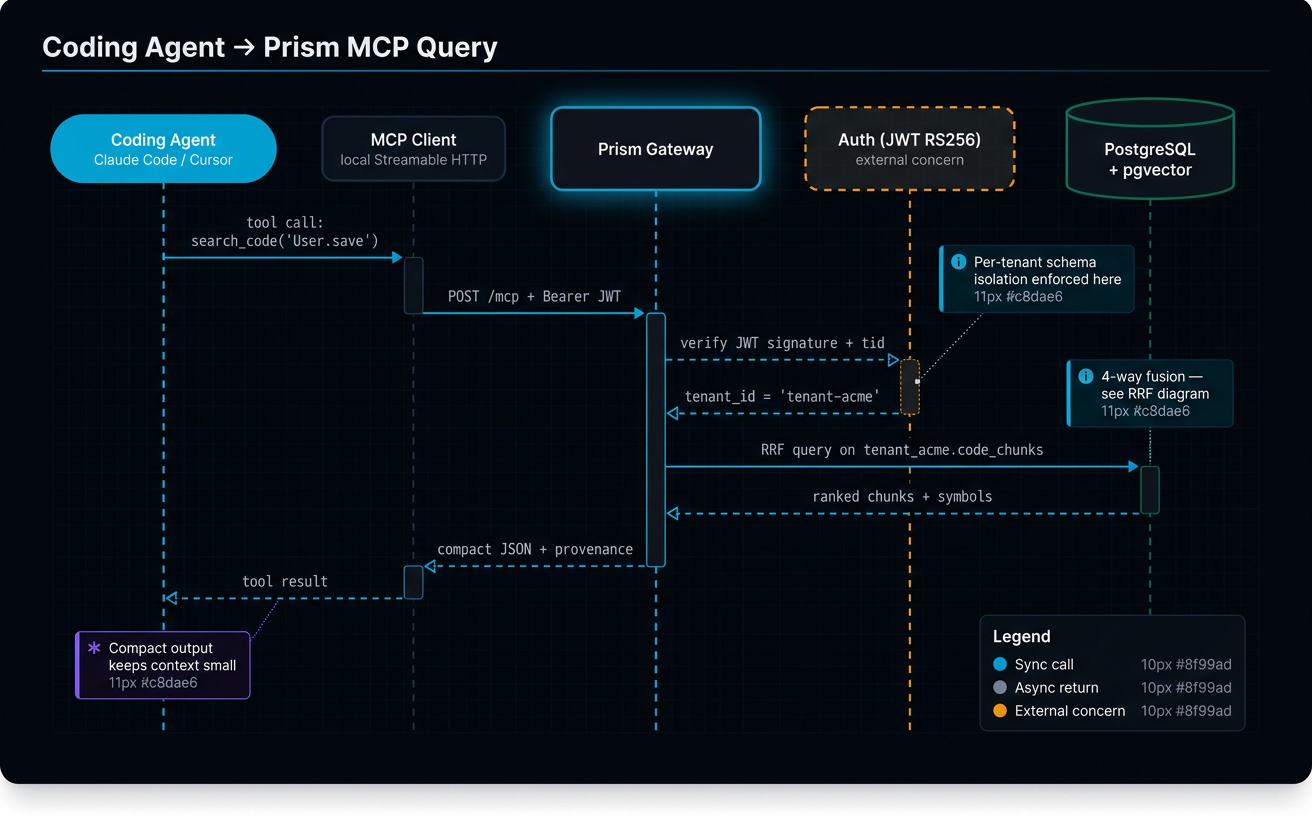
This guide takes a coding-agent user (Cursor, Claude Code, Windsurf, Codex, Devin, Antigravity, or any IDE with shell access) from "I have a developer token" to "my AI assistant uses prism instead of Grep inside this repo". Setup is a one-time job: install the CLI, set two env vars, verify, then drop a per-IDE rules snippet so your agent picks prism over Grep.
When to read this
- You just received a Prism developer token from the Console and want to wire up your IDE.
- Your AI assistant keeps using
Grepeven though this repo is indexed by Prism. - You are switching IDEs and need to add the Prism rule to the new IDE's rules file.
- You moved to a new machine and need to re-install the CLI.
If you don't have a token yet, start in Console Admin. If you are connecting Claude Desktop or another chatbot without shell access, use Chatbots — Setup instead.
Prerequisites
- A Prism developer token (from the Console — see Console Admin).
- Python ≥ 3.11 with
pipavailable.pipxworks too and is preferred on corp-locked systems. - Shell access in the IDE that will run your agent (Cursor, Claude Code, Windsurf, Codex, Devin, Antigravity).
Canonical URLs
These are the only two URLs Prism users normally need. Other guides reference them as "the gateway URL" / "the Console" — they are not redefined elsewhere.
| Surface | URL |
|---|---|
| Prism Gateway (production) | https://prism-gateway-xvsemyikqq-oa.a.run.app |
| Prism Console (production) | https://prism-console-swisper.web.app |
If your tenant has been provisioned on a non-production gateway, the Console will show the correct URL in the token-setup snippet — use that instead.
Install the CLI
The CLI ships as swisper-prism-cli on PyPI.
Or with pipx:
pip install --user puts the prism binary in ~/.local/bin, which most shells already have on PATH. If prism is not found after install, check that ~/.local/bin is on your PATH and open a new terminal.
Pin a known release rather than tracking latest when you depend on it in CI:
Run pip index versions swisper-prism-cli to see what's currently published. Contributors working on the CLI itself install from a local checkout instead: pip install --user -e apps/prism-cli/ from a Prism source clone.
Configure environment
prism reads two environment variables. Both are required: the token authenticates you, the base URL targets a specific gateway deployment.
Append to your shell profile (~/.zshrc or ~/.bashrc):
export PRISM_TOKEN="prism_<your-token>"
export PRISM_BASE_URL="https://prism-gateway-xvsemyikqq-oa.a.run.app"
Then open a new terminal. Sourcing the rc file from a non-interactive shell often won't pick the new vars up — a fresh terminal is the reliable path.
The Console's token-setup screen shows the exact export lines for your tenant; copy them rather than typing by hand to avoid placeholder strings like PASTE_YOUR_TOKEN_HERE leaking into your rc.
Verify
Two commands, two purposes. Run both in the new terminal.
Expected output:
If whoami returns 401, the token isn't being read. Re-check the export lines, then open a new terminal. If it returns a connect error or HTTP 000, the base URL is wrong or unreachable.
ping is auth-free — it only proves the CLI can reach the gateway. Use it to isolate connectivity from auth: if ping works but whoami returns 401, your token is the problem, not the network.
MCP setup with prism init {#mcp-setup-prism-init}
Beyond the CLI, Prism ships a local MCP server (prism mcp) that exposes the navigation tools to your agent as native, in-context tools — no shell round-trip. prism init is the one-time command that onboards a repo and wires that server up for you: it resolves the repo identity, writes a .prism/config marker, detects which agents are present, and registers prism mcp with each detected agent so the curated tools are injected every session. Run it once from the repo root:
prism initis per-repo, by design — run it once in each repo you want to use with Prism. This isn't a limitation, it's the onboarding model: you decide which repos Prism serves your agent in. A repo only returns results once it's connected/indexed in the Console, so onboarding stays a conscious, per-repo choice rather than something that silently spreads to every folder on your machine.If you'd rather register the
prism mcpserver once for all repos on your machine, runprism init --global— it writes the registration at user scope (~/.claude.jsonfor Claude Code,~/.cursor/mcp.jsonfor Cursor) so the server is available everywhere; the server auto-resolves which repo you're in from the working directory. Each repo still needs to be indexed in the Console to return results.
What gets registered, per agent
Claude Code, Cursor, and Windsurf all read the same mcpServers JSON shape — only the file path and scope differ:
| Agent | Config file written | Scope |
|---|---|---|
| Claude Code | .mcp.json (repo root) |
Project — committable |
| Cursor | .cursor/mcp.json (repo root) |
Project — committable |
| Windsurf | ~/.codeium/windsurf/mcp_config.json |
Global — per machine |
The entry written runs prism mcp and passes the token as an environment-variable reference, never a committed literal — so the committable configs (.mcp.json, .cursor/mcp.json) stay safe to check into VCS; the value of PRISM_TOKEN is read from your shell at launch. Registration is a non-destructive upsert: every other MCP server you already have is preserved.
Claude Code needs a one-time approval. A project-scoped .mcp.json server is present after prism init but its tools don't load until you approve it once — claude mcp list shows it as ⏸ Pending approval. Approve it on first launch; to reset the choice later, run claude mcp reset-project-choices.
The 12 tools you get (search, scan, find-refs, def, body, module-map, prepare-edit, check, outline, find, deps, list-repos) and how to use them day-to-day are covered in Coding Agents — Daily Workflow.
Discipline install (Fintama-internal)
If you work at Fintama, prism init can also install the swisper-superpowers discipline — the spec → plan → execute skills, prism-native navigation guidance, and code/maintainability review gates — for the same detected agents. This is gated behind the internal profile; public users skip it and bring their own skills/rules setup:
prism init --profile fintama                  # offers the discipline interactively (y/n)
prism init --profile fintama --discipline=yes # installs without prompting (CI / scripted)
prism init --profile fintama --discipline=no  # MCP registration only, no discipline
The default profile is public, which registers the MCP server and suppresses the discipline offer entirely. The install is idempotent — a version marker records it, so a second prism init reports "already installed" and skips.
Per-harness install matrix
What each detected harness receives. The non-Claude-Code skill harnesses share one vendored skills directory at the Agent-Skills interop path .agents/skills/; only Claude Code gets the full stack (skills + skill overrides + the prism-guard enforcement hook), because it is the only harness with a pre-tool-use hook primitive to hard-block Grep.
| Harness | MCP server | Skills | prism-guard hook | Operational note |
|---|---|---|---|---|
| Claude Code | yes | .claude/skills/ |
yes | one-time .mcp.json approval (above) |
| Codex CLI | yes | .agents/skills/ |
— | restart to pick up skills |
| Gemini CLI | yes | .agents/skills/ |
— | run /trust once, then restart |
| Copilot CLI | yes | .agents/skills/ |
— | restart to pick up skills |
| Cursor | yes | — (uses rules) | — | — |
| Windsurf | yes | — (uses rules) | — | global MCP config (per machine) |
A per-harness install is all-or-nothing: if any step fails, that harness's partial writes are rolled back, so init never leaves a half-configured agent.
Per-IDE rules file
Each IDE looks at a different file for AI rules. Add a Prism section to the right file so your agent uses prism instead of Grep/Glob for code search inside this repo. The minimal snippet below is enough to nudge the agent in the right direction; the full substitution table and edit-time triggers live in Coding Agents — Daily Workflow.
| IDE | Rules file path | Section heading to add | Minimal snippet anchor |
|---|---|---|---|
| Cursor | .cursor/rules/prism.mdc |
(whole file is the Prism rule) | See cli-workflow.md for the full rule; minimum: "Use prism instead of Grep/Glob for code search." |
| Claude Code | CLAUDE.md (repo root) |
## Prism CLI for Code Navigation |
Same — link from CLAUDE.md to cli-workflow.md. |
| Windsurf | .windsurfrules |
## Prism CLI for Code Navigation |
Same. |
| Codex | AGENTS.md (repo root) |
## Prism CLI for Code Navigation |
Same. |
| Devin | Devin.md (repo root) |
## Prism CLI for Code Navigation |
Same. |
| Antigravity | AGENTS.md (repo root) |
## Prism CLI for Code Navigation |
Same. |
The Console's token-setup flow generates the full content for each file. For a new repo, ask your IDE's AI to paste the Console snippet into the right file.
Verify your IDE is using prism
Open the IDE's AI chat and ask:
Use prism to find references to a symbol in this repo.
A correctly configured agent runs prism find-refs "<Symbol>" (or prism refs) and returns grouped results with indexed_at metadata. If it falls back to Grep for the symbol name, the rules file isn't being read — re-check the file path for your IDE in the table above and confirm the section heading exists.
For deeper validation, ask the agent to find a helper before writing one: it should call prism check "<intent>" first. If it skips that step, the rule snippet is too thin — link the rules file to cli-workflow.md so the agent loads the full substitution table.
FAQ
Q: What's the difference between prism whoami and prism ping?
A: prism ping is auth-free and only proves the CLI can reach the gateway URL. prism whoami exercises the full auth path and returns your tenant ID when the token is valid. Use ping to isolate network problems from auth problems — if ping works and whoami returns 401, your token is wrong; if ping fails, PRISM_BASE_URL is wrong or the gateway is unreachable.
Q: How do I rotate my token?
A: Tokens never expire, but you should rotate them if a token leaks. Open the Console, go to Settings → Tokens, create a new token, update PRISM_TOKEN in your shell rc (and any CI secrets), open a new terminal, run prism whoami to confirm, then revoke the old token from the Console. See Console Admin for the full token lifecycle.
Q: Do I need both PRISM_TOKEN and PRISM_BASE_URL?
A: Yes. PRISM_TOKEN authenticates you (the gateway has many tenants); PRISM_BASE_URL targets a specific gateway deployment. The CLI has a default base URL that only resolves for the production alias — non-production tenants must set the URL explicitly, and the Console always shows the right one for your tenant.
Q: My IDE still uses Grep — what's wrong?
A: Three usual suspects. (1) The rules file isn't at the path the IDE expects — check the table above and confirm the file is at the repo root (or .cursor/rules/ for Cursor). (2) The rules file was added but the IDE was opened before the file existed — restart the IDE. (3) The snippet you pasted is too generic — link to Coding Agents — Daily Workflow so the agent loads the full substitution table including find-refs, prepare-edit, and check.
Q: Can I have multiple repos indexed?
A: Yes. Most tenants index one repo and the CLI auto-scopes to it. For multi-repo tenants, pass --repo "Owner/Name" per command, or run prism list-repos to see what's indexed. The Console manages which repos belong to your tenant — see Console Admin.
Q: My corp Python install rejects pip install --user — what now?
A: Use pipx install swisper-prism-cli instead. pipx isolates the CLI in its own venv and works on corp-locked systems where --user is disabled. It also handles the PATH setup for you on first run.
Related
- Coding Agents — Daily Workflow — once setup is done, this is the full substitution table and edit-time triggers your agent should follow.
- Branches, Overlays & Freshness — for long-lived feature branches, register an overlay so search and find-refs reflect branch-only changes.
- Console Admin — token lifecycle, repo connection, team management.
- Chatbots — Setup — Claude Desktop and other MCP clients that don't have shell access.