Part VI · Running development
The design workbench
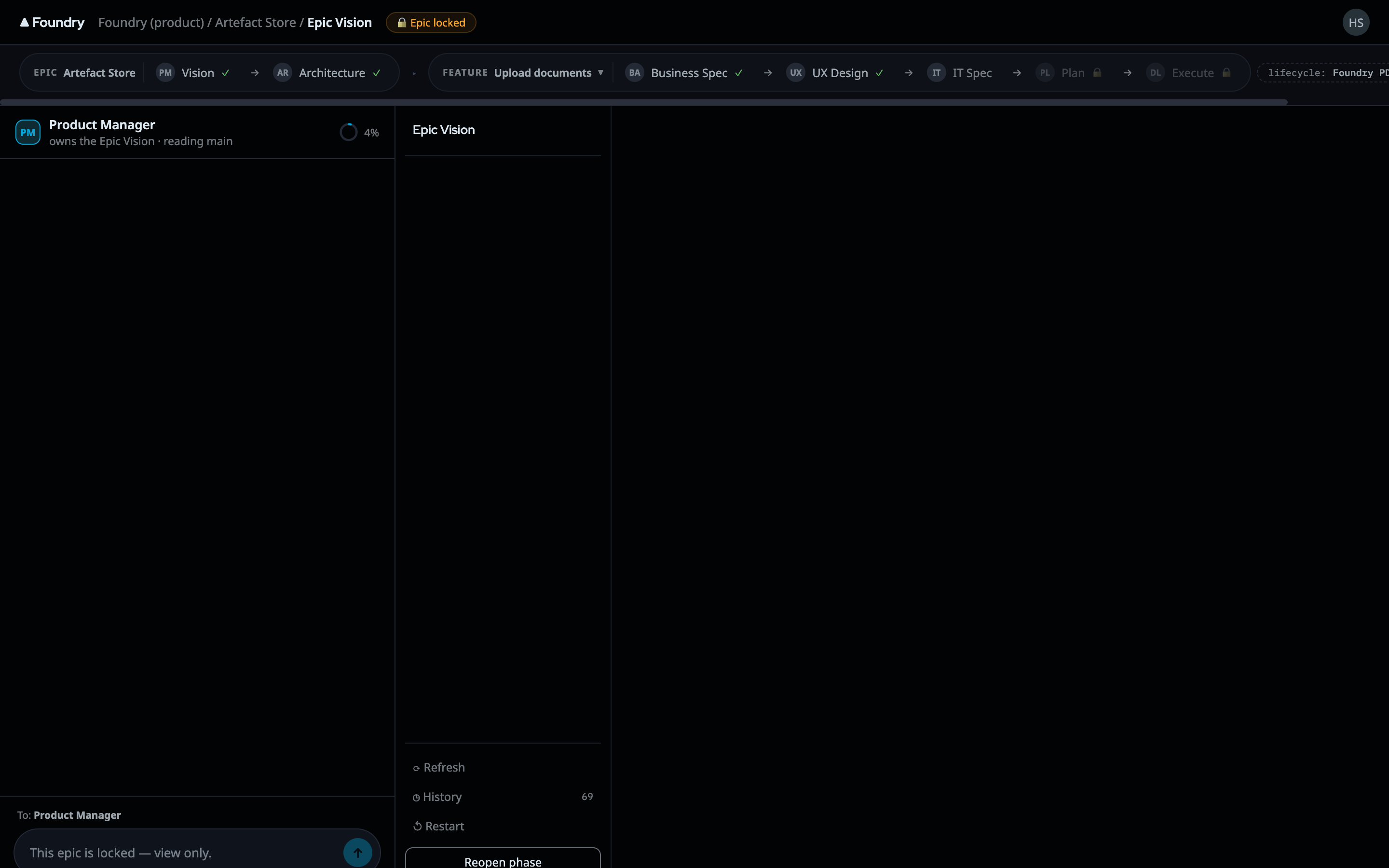
The workbench is where the thinking phases happen. Every phase before execution — vision, architecture, business spec, UX, IT spec, plan — is a conversation with the agent who owns that phase, and every conversation produces one structured artifact. The workbench puts both side by side: the chat on one side, the living document on the other.
About these images
The screens on this page are design mocks — in Foundry's process, produced mocks are the binding implementation spec. Live-rig screenshots follow with the capture batch.
Epics, features, and the lifecycle bar
Work is organized in two tiers, and both tiers get a workbench:
- Epics (the container tier) carry the big-picture phases — Vision, Architecture. Open one from the Mission Control board or the sidebar.
- Features (the delivery tier) carry the phases that turn a scoped piece of work into shipped code — Business Spec, UX, IT Spec, Plan, Execute.
The tier names themselves are lifecycle data — if your lifecycle calls them "Initiatives" and "Stories", the workbench says so.
Across the top of every workbench runs the lifecycle bar: each phase as a step, colored by state (done, active, not started, locked). It is the phase sequence your lifecycle defines — the workbench renders your process, it does not impose one. A feature switcher moves between the features of the epic without leaving the workbench.
Phase chats: talking to the agent who owns the phase
Each phase's chat is a real conversation with the agent configured for that phase in your lifecycle — the PM agent for vision, the Architect for architecture, the BA for the business spec, and so on. This is not a thin prompt box: a phase turn runs through Foundry's full agent chain (the same orchestration spine execution uses), with streaming replies, visible tool activity, and the phase's upstream context injected — each phase receives as much upstream material as it needs and as little as possible, which is why a spec conversation does not drown in the vision document's every word.
The agent's job in a design phase is to fill the artifact — and that distinction matters: the chat is the means, the artifact is the product. Nothing that matters is allowed to live only in the scroll.
The artifact: schema-driven sections
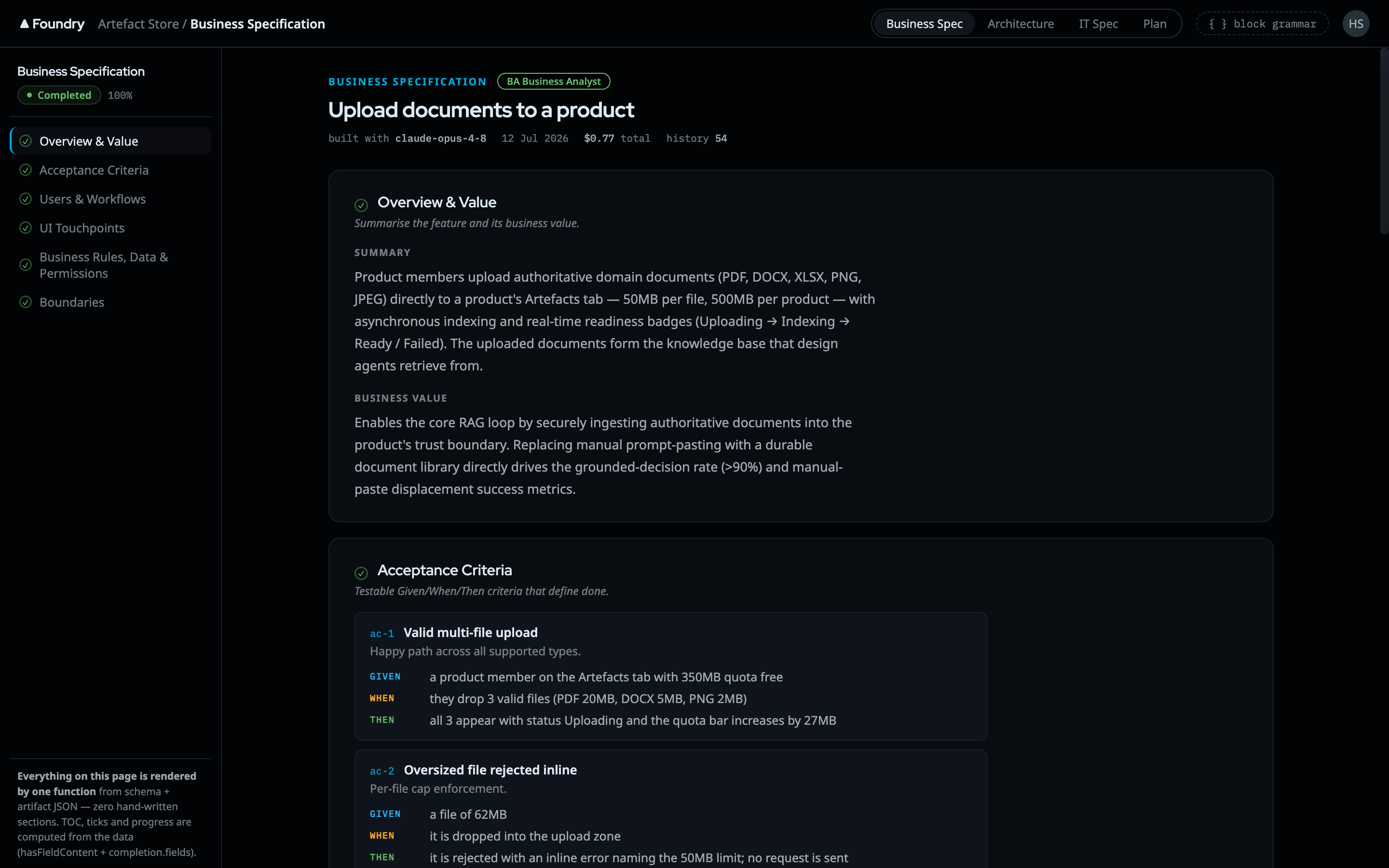
Every phase produces exactly one artifact, and the artifact's shape is declared as a schema, not hardcoded: its sections and fields are JSON Schema definitions your lifecycle owns (editable in the Artifact Designer). The workbench renders whatever the schema says — add a section to the schema and every product on that lifecycle gets it, with no code change.
Three mechanics keep artifact work disciplined:
- Read-first, server-owned advance. Sections open in order. Which section is active and which are still locked is decided by the server, not by the agent — when a section's work is genuinely done, the system itself advances the flow. Agents are explicitly forbidden from declaring their own progress, because an agent that can skip ahead is an agent that can skip the hard questions. The current section is highlighted in the canvas; locked ones wait their turn.
- Schema-completeness progress. The progress donut shows the fraction of required sections actually filled — computed server-side against the schema, not self-reported. A document is "80% done" because 8 of 10 required sections contain valid content, not because someone felt optimistic.
- Optional sections are opt-in. Sections the schema marks optional stay out of the flow (and out of the completeness denominator) until you deliberately pull one in. The artifact carries what this feature needs — no ritual filling of irrelevant sections.
Every change is versioned. The history drawer shows the artifact's append-only version trail — one entry per agent turn or block of human edits, filterable by who and what made the change — so "what did this say before the architect's last pass?" is always answerable.
Approval and drift — the phase-level gate
When a phase's artifact is ready, you approve the phase. Approval is a deliberate ceremony with real semantics:
- It pins the exact version you approved. Downstream phases consume that pinned version — not "whatever the document says today".
- If the artifact is edited after approval, its status flips to drifted. The approved pin still stands (downstream keeps consuming what you signed off), but the workbench shows plainly that the live document has moved past your signature, and the Approve action returns so you can re-pin.
- Upstream drift is tracked too. Each phase records which upstream versions it consumed; when an upstream artifact is re-approved at a newer version, the readiness panel shows exactly which inputs have moved. You decide whether the phase needs rework or a simple re-approval with a note.
Approval operates on the whole phase. Within the artifact, the mechanics above (server-owned advance, completeness, versions) track progress; sign-off happens once, at the phase gate, by you.
Approving epic-level work has one more consequence: once feature work starts under an approved epic, the epic locks. You can read its artifacts but not casually edit them — changing the foundation under in-flight features is a decision, so unlocking is an explicit, warned action (and re-approving locks it again).
The UX phase: Design Stage and real HTML mocks
What the phase is called
The phase is labelled UX in the product — the lifecycle carries it as feature_ux, and the Foundry Default lifecycle runs seven phases: Vision, Architecture, Business Spec, UX, IT Spec, Plan, Execute. Mock screens on this page may show an older UX Design label; the phase is the same one.
The UX phase gets its own full-screen surface — the Design Stage — because design review needs space, not a chat column.
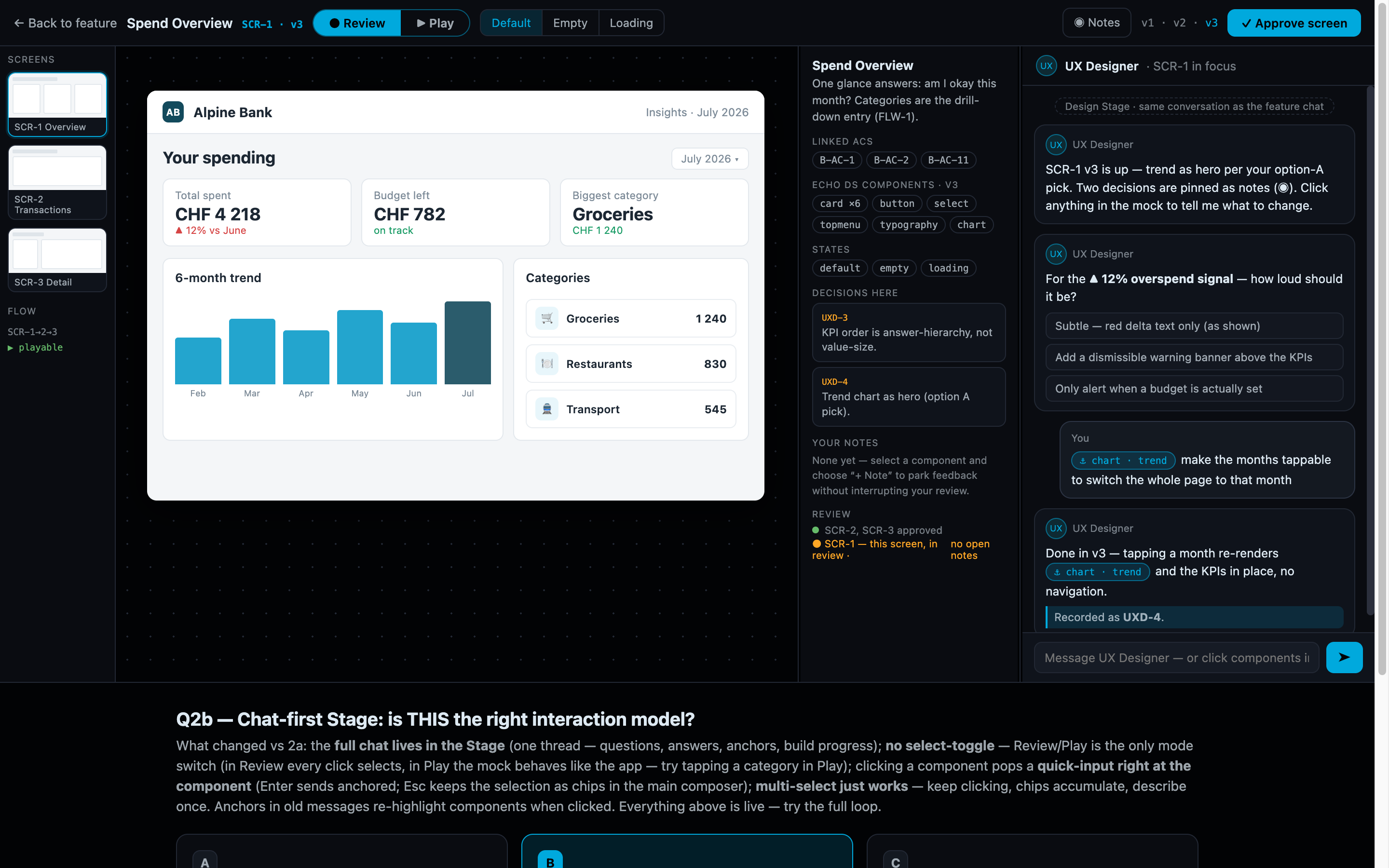
The stage is built around screens: a screens rail listing every screen the UX agent has produced, variant tabs where alternatives exist, a flow overview connecting screens into journeys, and a metadata rail for briefs and stage notes. You react exactly where you see the issue — anchor a note or an "improve this" ask to a specific screen or selection, and the request goes to the UX agent with that anchor attached.
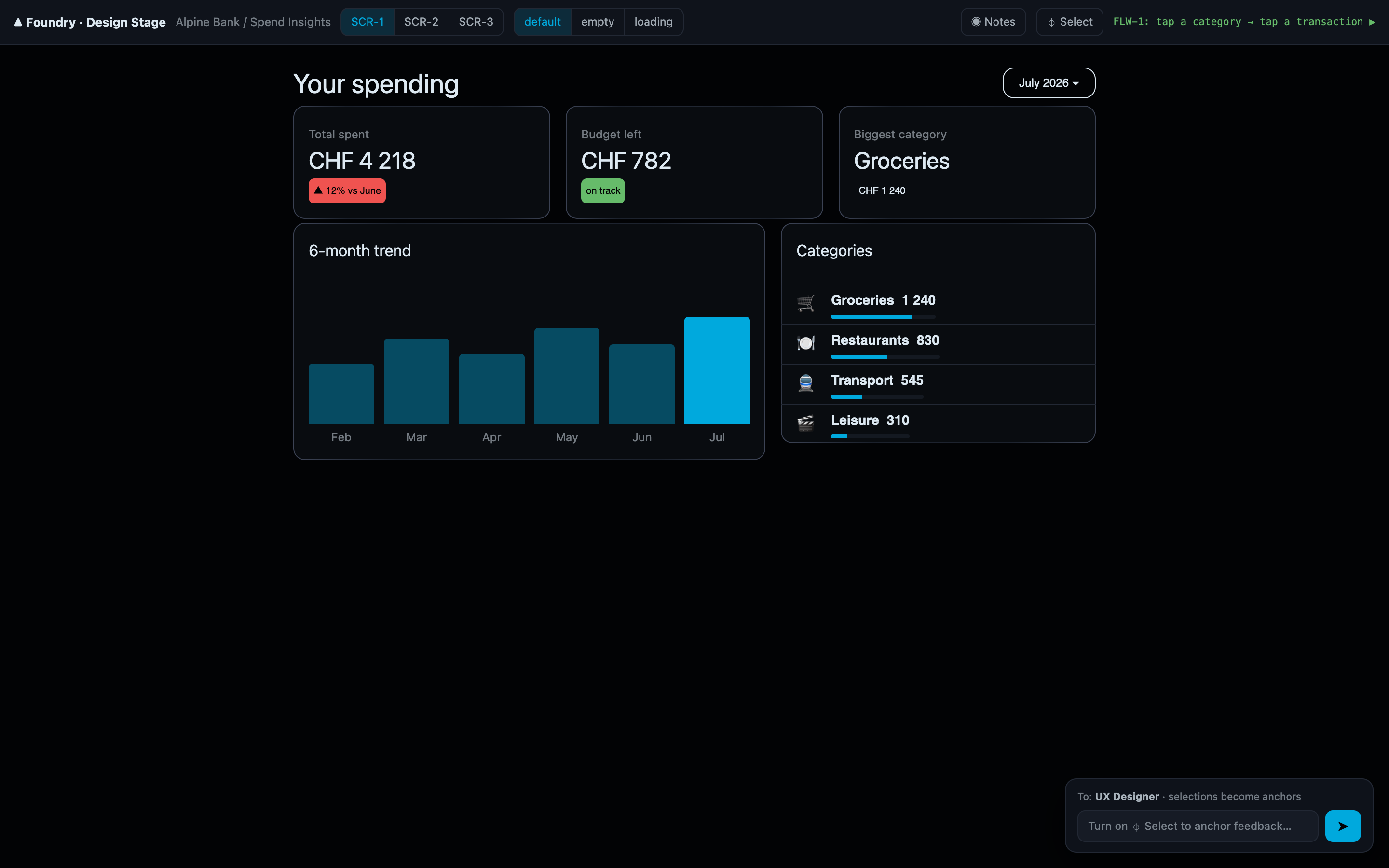
The mocks themselves are the point. The UX agent does not paint pictures — it builds real HTML prototypes through the mock-kit, with dedicated build and screenshot tools, referencing your actual design system (the agent queries the DS through its design-system tool rather than inventing look-alike styles). The consequence is the strongest guarantee in the phase: an approved mock is not an inspiration for the build — it is the implementation skeleton, in the same visual language the product ships with. Where the design system lacks something the design needs, the agent files a design-system gap record instead of silently faking the component — the gap becomes a tracked decision, not a surprise at build time.
Design phases end with an explicit human Mark complete / approve — deliberately manual, because design quality is a human judgment no completeness metric can stand in for.
Assistance surfaces
Inside the workbench, your assistant is the phase agent — that is who you talk to. The product shell's Copilot side panel (see Mission Control) is a separate, generic surface: today it shows its context-awareness line with a disabled composer, honestly badged until the product copilot backend lands. The same Copilot engine already powers the onboarding interview and the prompt-editing assistant in the Agent Editor.
When design is done
The Plan phase's artifact — the task plan — is the handoff. From there the feature moves to the execution workbench, where an agent team builds what these documents specify, and every merge gate points back at the artifacts you approved here.