Part VI · Running development
Mission Control
Mission Control is the product home — the shell you land in when you open a product. It answers the two questions a product owner asks every morning: where is delivery right now? (the delivery board) and what does this product know? (the knowledge registers). Everything else — workbenches, run cockpits, settings — is reached from here.
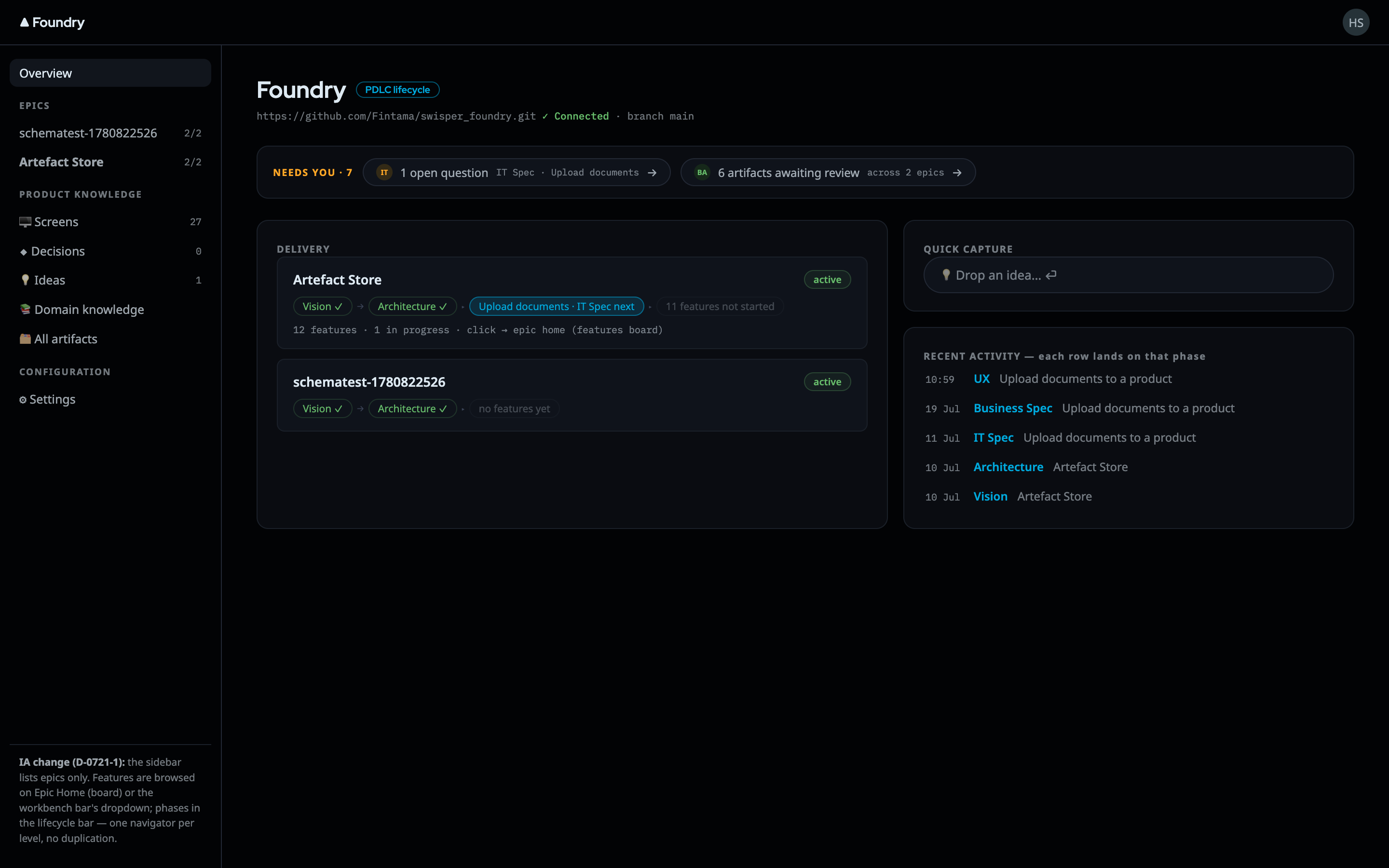
About these images
The screens on this page are design mocks — in Foundry's process, produced mocks are the binding implementation spec, so they show the target faithfully. Live-rig screenshots will replace them as the capture batch lands. One honest difference you will see live today: the Mission Control entry in the sidebar carries a "COMING SOON" badge. The page behind it is real and working — the badge marks that the Missions concept (packaging epics into marketable increments) has not shipped yet, and Foundry's UI rules forbid pretending otherwise.
The product shell
Every product page shares one sidebar, so the product's whole world is always one click away:
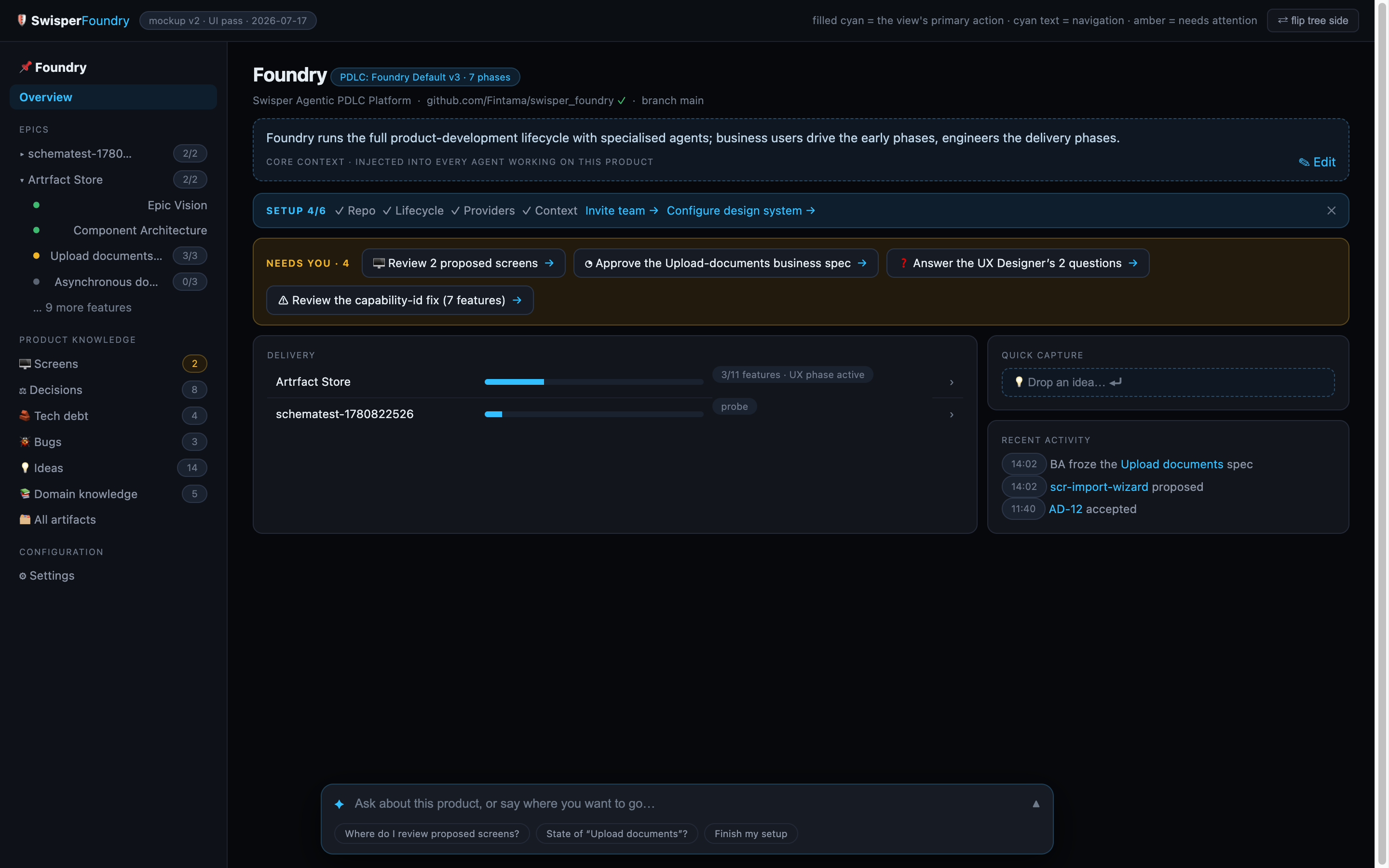
- Overview — the product's front page.
- Mission Control — the delivery board described below.
- EPICS — every epic, plus + New epic.
- PRODUCT KNOWLEDGE — the registers: Screens, Decisions, Tech debt, Bugs, Ideas, Domain knowledge, and All artifacts. (Domain knowledge is an honest placeholder today — it lands with the Artefact Store epic and says so on the page.)
- CONFIGURATION — product settings: General & Core context, Lifecycle (PDLC), Team, Providers & Agents, Design System, Dev Environment, Preview, Repo & Branch.
A Copilot side panel rides along the shell as a collapsed vertical tab. Expanded, it shows an awareness line — "I can see: Decisions · 12 items" — fed by whatever page you are on. In the current version its composer is deliberately disabled and badged coming-soon: the panel ships its chrome and its context contract first, and grows the conversation when the product copilot backend arrives. No fake replies, by design.
The delivery board
The Mission Control page itself is the delivery board: every epic as a card, grouped by state, so status is readable in one glance and every card is a working entry point.
- Summary strip — total epics, features, features in progress, features in design.
- Three groups — In flight (at least one feature phase actively in progress), Up next (not started yet), Complete (every feature's phases done). The grouping is derived live from each epic's lifecycle state — nobody maintains it by hand, so it cannot go stale.
- Epic cards — name, feature counts, one chip per epic-level phase (Vision, Architecture, …) colored by completion, and a segmented bar with one segment per feature (done / active / pending). Clicking a card takes you straight to the most useful place: the first in-progress feature's workbench, or the epic's own workbench if nothing is running yet. Cards never dead-end.
- + New epic — both the header button and the dashed card in Up next open the same creation modal. You name the epic; the PM agent builds the vision with you from there. New epics are unassigned to any mission by default.
The dashed Missions band above the board is inert and badged coming soon. Missions will package epics into marketable, shippable increments — sequencing, dependencies, burnup. Until then, every epic lives directly on the board. The band exists so the information architecture is already honest about where missions will sit.
You may also notice what the board does not show: no "needs you" counters, no last-touched timestamps. Foundry's honest-UI rule forbids rendering numbers no backend actually provides — those cells appear when the data does.
The knowledge registers, at a glance
Under PRODUCT KNOWLEDGE the product keeps five typed registers. They are product-scoped records, not lifecycle artifacts — filing one takes seconds and requires no phase or approval ceremony.
| Register | Kind | What it holds |
|---|---|---|
| Decisions | adr |
Architecture & product decisions — what we chose and why |
| Tech debt | tdr |
Known debt: description, impact, remediation |
| Bugs | bug |
Defects raised by humans or agents |
| Ideas | idea |
The wish backlog — capture first, judge later |
| Screens | screen |
The product's screen registry |
How records flow in and out
Records arrive from two directions, and the register does not care which: humans file them in the UI (decisions open a small dialog; ideas are a single inline input — press ⏎, done), and agents file them mid-work through dedicated record tools, with provenance stamped automatically. Every record gets a stable, citable display id — AD-7 (an Architecture Decision Record), TD-3 (a Tech-Debt Record), BUG-12, SCR-4 — assigned at creation and never reused; ideas deliberately display without a prefix. Agents may file records; only a human decides them: settling one stamps decidedBy and decidedAt, and newer decisions supersede rather than overwrite older ones.
Ideas and tech-debt records also feed delivery directly: the Add-feature modal offers From Idea and From TDR sources, which seed the feature from the record, store the record as the feature's permanent source record, and flip the record to promoted — all in one transaction. The full mechanics — content schemas, agent phase-gating, supersession chains, promotion — are in Decisions & ideas.
Where to go next
- Working on an epic or feature? The design workbench.
- Building it? The execution workbench.
- The registers in depth: Decisions & ideas.